
 Join our Discord
Video : https://www.youtube.com/watch?v=Gqlcl_MNzFA&t=3s
# phils-objectspawner
Object, ped, animal, and VFX spawner with player status system for RedM (RSG Core + ox_lib).
## Commands
| Command | Description |
|---|---|
| `/object` | Open the main spawner menu |
| `/status` | Open the player status menu |
| `/clearstatus` | Clear your active player status |
## Features
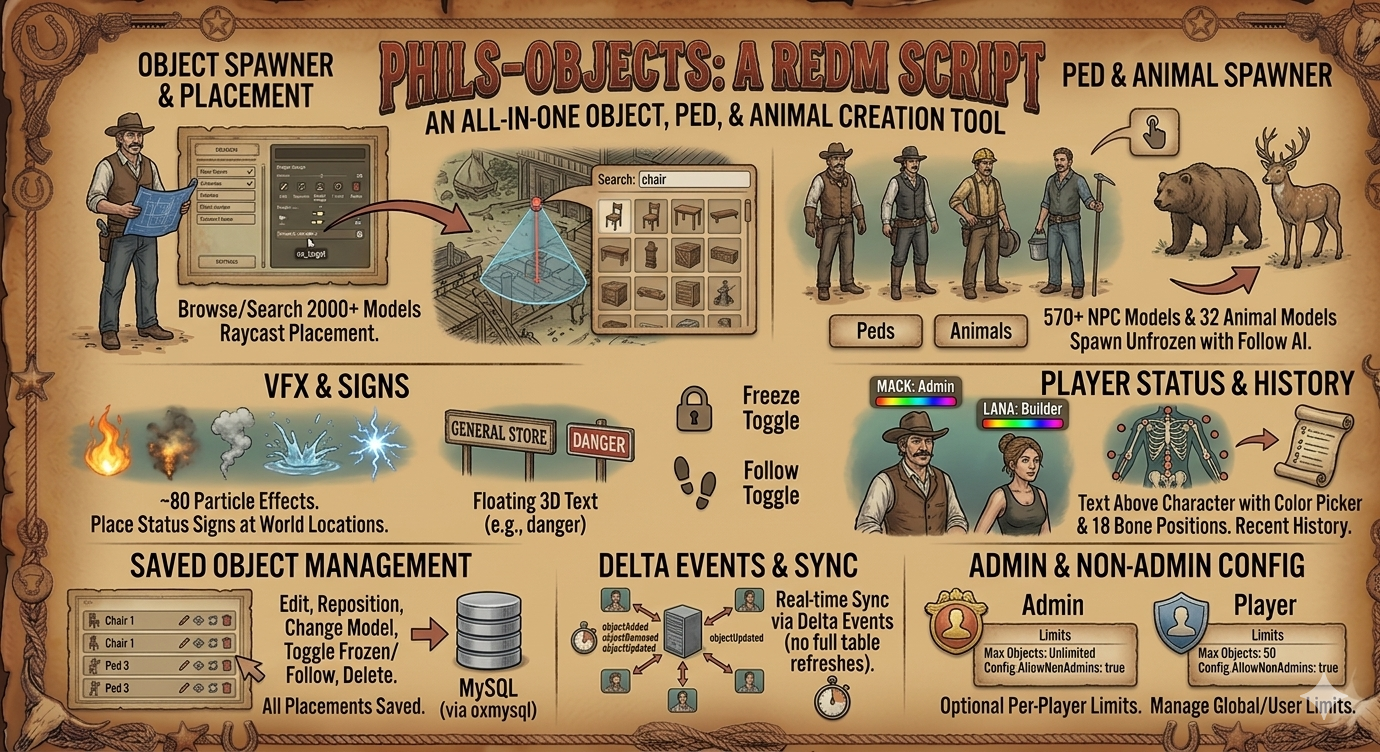
- **Spawn objects** — browse/search from 2000+ models, place with raycast placement
- **Spawn animals** — 32 animal models, spawn unfrozen with follow AI
- **Spawn Peds** — 570+ NPC models, spawn unfrozen with follow AI
- **VFX effects** — ~80 particle effects (fire, smoke, water, sparks, etc.)
- **Place status signs** — floating 3D text at any world location
- **Player status** — text above your character with color picker, 18 bone positions, recent history
- **Saved object management** — edit, reposition, change model, toggle frozen/follow, delete
- **ox_target integration** — right-click to edit/delete spawned objects, VFX, and status signs
- **Persistent storage** — all placements saved to MySQL via oxmysql
- **Delta events** — real-time sync via `objectAdded/Removed/Updated` events (no full table refreshes)
- **Non-admin support** — optional per-player limits via `Config.AllowNonAdmins` / `Config.MaxObjectsPerPlayer`
- **Freeze toggle** — freeze/unfreeze any placed object or ped instantaneously
- **Follow toggle** — make spawned animals/peds follow you (re-issued every 3s)
## Configuration
Edit `config.lua`:
| Setting | Default | Description |
|---|---|---|
| `Config.Command` | `'object'` | Command to open the main menu |
| `Config.AdminGroup` | `'admin'` | RSG Core admin group for full access |
| `Config.AllowNonAdmins` | `false` | Allow non-admins to use the spawner |
| `Config.MaxObjectsPerPlayer` | `5` | Max objects per non-admin player |
| `Config.LaserDistance` | `50.0` | Max raycast placement distance |
| `Config.RenderDistance` | `150.0` | Render distance for saved objects |
| `Config.MoveStep` | `0.05` | Keyboard fine-adjustment step |
| `Config.RotateStep` | `2.5` | Rotation step in degrees |
- Animal/ped model lists: `data/animals.lua`, `data/peds.lua`
- VFX list: `Config.VfxList` in `config.lua`
## Dependencies
- [rsg-core](https://github.com/Rexshack-RedM/rsg-core)
- [ox_lib](https://github.com/overextended/ox_lib)
- [oxmysql](https://github.com/overextended/oxmysql)
- [ox_target](https://github.com/overextended/ox_target)
## Installation
1. Place the resource in your `resources` directory
2. Add `ensure phils-objectsv2` to your `server.cfg`
3. Run the SQL migration (`install.sql` if provided)
4. Restart the server
## Usage
### Placing objects
1. Type `/object`
2. Choose **Search objects**, **Animals**, **Peds**, or **Create new object**
3. Aim at the ground with your crosshair — a preview appears
4. Use arrow keys (yaw), **Q/E** (roll), **Up/Down** (pitch) to rotate
5. Hold the confirm prompt key to place
### Player status
1. Type `/status` or use **Player Status** from the main menu
2. Click **Set New Status** — enter text (pipe `|` separates lines), pick a color
3. Text floats above your character, visible to all nearby players
4. Use **Recent Status** to re-apply previously saved text
### Managing saved objects
- Open the main menu → **Saved objects**
- Click any entry to teleport, reposition, toggle frozen/follow, change model, or delete
- VFX and status signs have their own edit options
### Non-admin usage
Set `Config.AllowNonAdmins = true` in `config.lua`. Non-admins can:
- Open the menu and spawn objects (up to `MaxObjectsPerPlayer`)
- Edit and delete only their own objects
- All players see all placed objects in the world
## Key Bindings
During placement:
| Key | Action |
|---|---|
| Left/Right arrows | Rotate yaw |
| Up/Down arrows | Rotate pitch |
| Q | Rotate roll (positive) |
| E | Rotate roll (negative) |
| Hold confirm prompt | Place object |
| Hold cancel prompt | Cancel placement |