
 Join our Discord
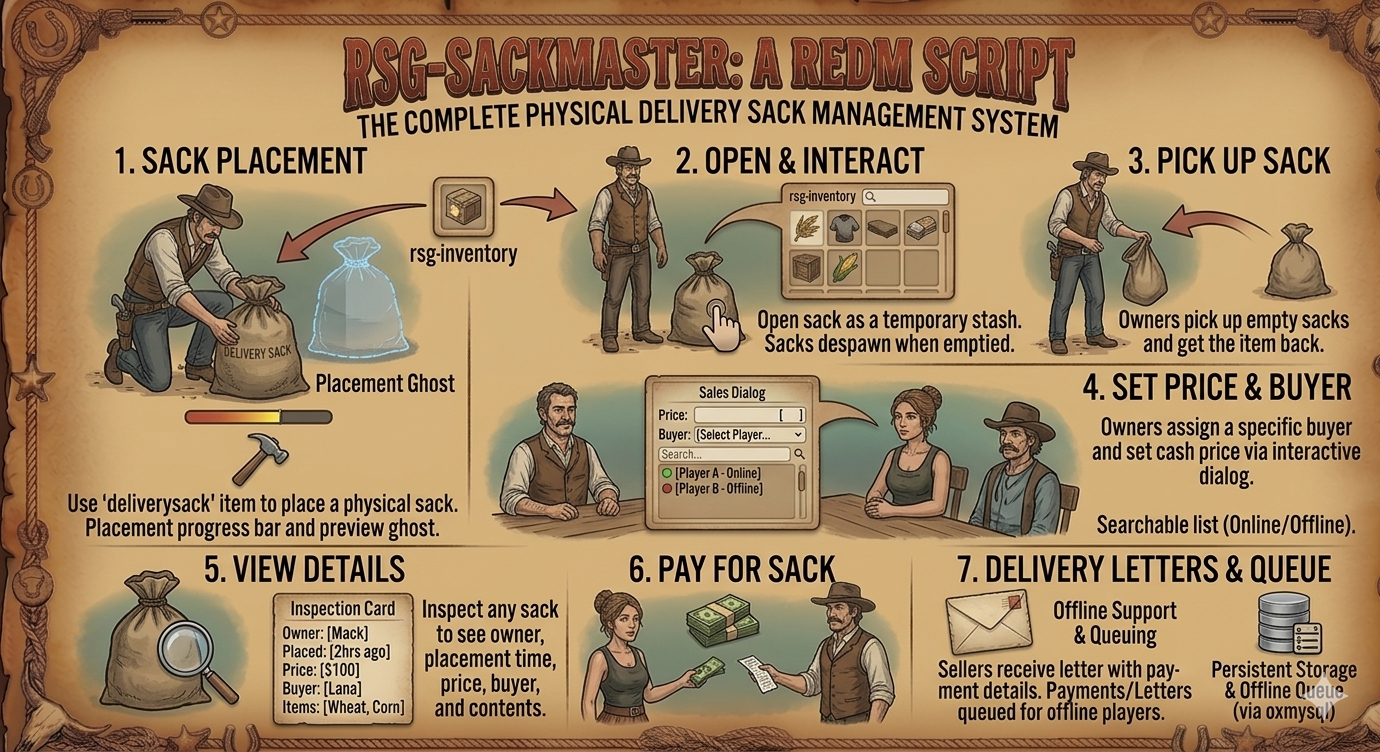
# mack-deliverysacks
Video : https://medal.tv/games/red-dead-2/clips/mMpmI43P1BVNg_TVB?invite=cr-MSx1a3EsMTkxMDIwMzU5
A RedM RSG-Core script for placing, selling, and purchasing physical delivery sacks in the world.
## Features
- **Place Sacks** – Use a `deliverysack` item from inventory to place a physical sack prop in the world with a placement progress bar and preview ghost.
- **Open Sack** – Open any sack as a temporary stash using `rsg-inventory`. Sacks automatically despawn when emptied.
- **Pick Up Sacks** – Owners can pick up empty sacks and get the item back.
- **Set Price & Designate Buyer** – Owners can assign a specific buyer and set a cash price via an interactive dialog with a searchable player list (online/offline indicators).
- **Pay For Sack** – The designated buyer can pay the asking price. Cash is transferred to the seller.
- **View Details** – Inspect any sack to see owner, placement time, price, designated buyer, and item contents.
- **Delivery Letters** – Sellers receive an in-game letter with payment details when their sack is purchased.
- **Offline Support** – Payments and letters are queued for offline players and delivered on next login.
## Dependencies
- [rsg-core](https://github.com/Rexshack-RedM/rsg-core)
- [ox_lib](https://github.com/overextended/ox_lib)
- [ox_target](https://github.com/overextended/ox_target)
- [rsg-inventory](https://github.com/Rexshack-RedM/rsg-inventory)
- [oxmysql](https://github.com/overextended/oxmysql)
## Installation
1. Copy `mack-deliverysacks` to your server's `resources` directory.
2. Add `ensure mack-deliverysacks` to your `server.cfg` (after its dependencies).
3. Add the items from `installation/install.lua` to your `rsg-core/shared/items.lua`:
- `deliverysack` – The sack item players use to place sacks.
- `deliveryletter` – The letter item for delivery payment notifications.
4. Copy the images from `installation/` to your inventory's image folder.
## Configuration
Edit `config.lua`:
| Setting | Default | Description |
|---------|---------|-------------|
| `LetterSettings.Enabled` | `true` | Toggle delivery letters |
| `SackMaxWeight` | `100000` | Max inventory weight per sack |
| `SackMaxSlots` | `10` | Number of slots per sack |
| `SackProp` | `p_cs_vegsack_up` | Prop model for the sack |
| `SackItem` | `deliverysack` | Item name for the sack |
| `NotifySystem` | `'ox_lib'` | Notification system (`'ox_lib'` or `'bln_notify'`) |
| `ForwardDistance` | `1.5` | Distance in front of player to place sack |
| `PlaceTime` | `3000` | Placement progress bar duration (ms) |
| `PlacementHeight` | `0.05` | Height offset to prevent floor clipping |
| `EnableBlip` | `false` | Show blips on placed sacks |
| `Debug` | `true` | Allow owners to pay for their own sacks |
## Usage
1. **Placing** – Use the `deliverysack` item from your inventory. A ghost preview appears while you hold the placement key.
2. **Opening** – Walk up to a sack and select "Open Sack" via ox_target.
3. **Setting a price** – As the owner, select "Set Price" to choose a buyer and price.
4. **Paying** – The designated buyer selects "Pay For Sack" to complete the purchase.
5. **Picking up** – Owners can pick up empty sacks with "Pick Up Sack".
6. **Viewing** – Select "View Details" to see owner, price, items, and timing.
## Locales
Translations are in `locales/en.lua`. Add additional locale files following the same format.
## License
This script is provided as-is. Modify and distribute as needed for your server.