
 Join our Discord
# mack-printingpress
Video : https://medal.tv/games/red-dead-2/clips/n6yWhi2rjF2qL4Zui?invite=cr-MSx2ZTYsMTkxMDIwMzU5
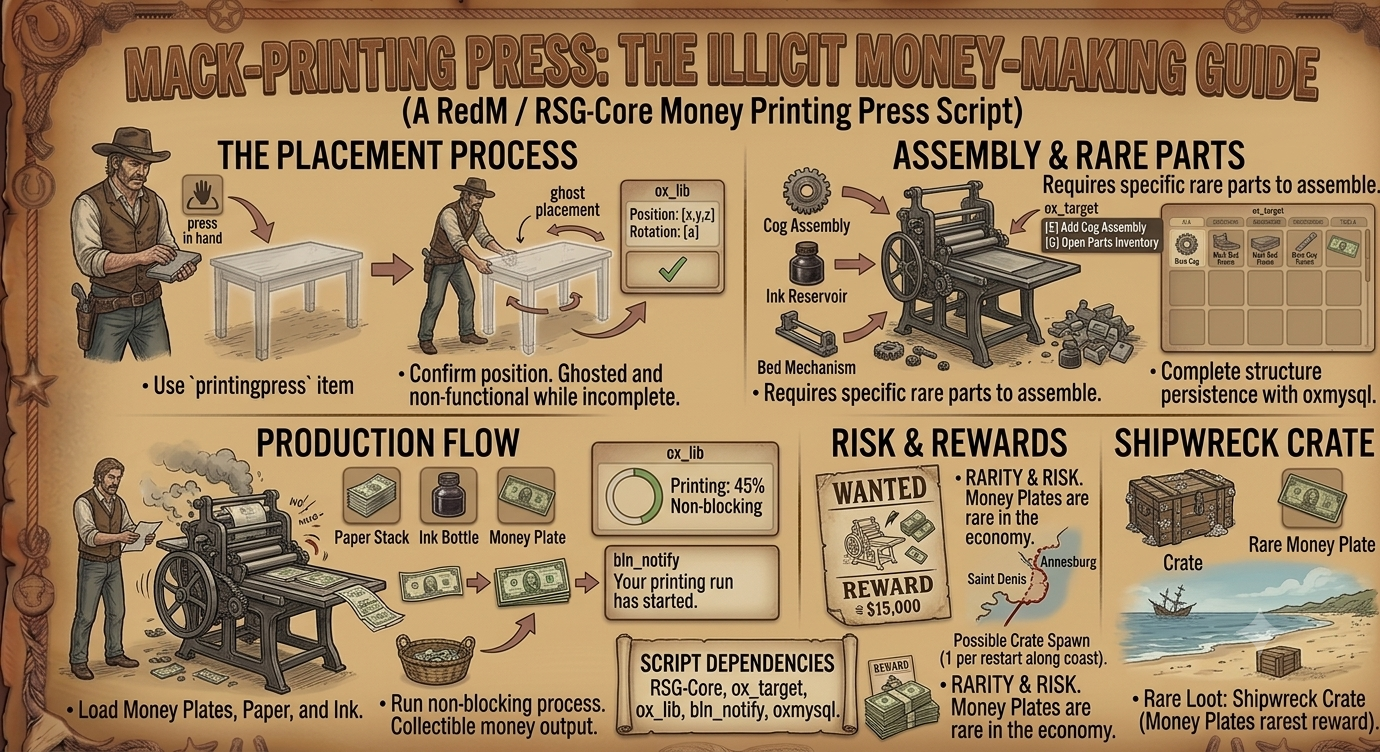
`mack-printingpress` is a RedM / RSG-Core money printing press script built around a placeable, multi-part printing press. Players use a `printingpress` item to place a press in the world, assemble it with rare parts, load money plates, paper, and ink, then run a non-blocking print process that creates collectible money output. The script uses `ox_target` for all world interactions, `ox_lib` for context/progress interactions, `bln_notify` for player notifications, and `oxmysql` for persistent placed press storage.
The press is designed around rarity and risk. The core parts and especially the money plates can be made rare through your economy, while the included shipwreck crate feature can spawn one rare crate per server restart along the coastline between Saint Denis and Annesburg. That crate can contain one configured printing item, with money plates set as the rarest reward by default.
## Main Features
### Placeable Printing Press
Players use the `printingpress` inventory item to start a prop placement flow. The placement system uses the same style of ghost placement flow as the reference moonshine script:
- Use the `printingpress` item.
- A ghosted main table prop appears.
- Player positions and rotates it.
- Player confirms placement.
- The press is saved to the database.
- The press remains ghosted while incomplete.
- Once all required structural parts are installed, it becomes ready.
Placed presses are persistent through the `printingpress_presses` database table.
### Multi-Part Assembly
The press is assembled from multiple inventory items. Each installed item spawns a matching world prop:
- `slidingbed` adds the Sliding Bed prop.
- `togglemech` adds the Toggle Mechanism prop.
- `paperframe` adds the Paper Frame prop.
All three structural parts are required before the press becomes ready for printing.
### Breakable Part Condition System
The old random instant-break system has been replaced with condition wear for the breakable parts.
Breakable parts:
- Toggle Mechanism
- Paper Frame
Each starts at 100% condition when installed. Every successful print run reduces condition by a random configured amount:
- Toggle Mechanism loses `8–18%` by default.
- Paper Frame loses `5–14%` by default.
When a breakable part reaches 0%, it is removed from the press, the prop disappears, and the press returns to the assembling state. The player must install a replacement part before printing again.
The UI displays the condition of each breakable part as:
- Text percentage, for example `74%`
- A progress-style condition bar
- Green/yellow/red condition color ranges
Legacy placed presses with older boolean part data still work. A legacy `true` value is treated as 100%.
### Money Plates
Money plates are a special part:
- They are required to print.
- They are not consumed during print runs.
- They are unique by default in the item list.
- They are intended to be the rarest item.
- They can be returned when the press is removed or destroyed, depending on the interaction.
The money plates item is:
`moneyplates`
### Per-Run Supplies
Each print run consumes:
- `moneypaper`
- `printingink`
These appear as loaded props on the press and are removed after a successful print.
### Non-Blocking Print Process
The print process does not lock the player in a normal progress bar. Instead:
- Player targets the press.
- Selects `Run Print Process`.
- Server starts a timed print run.
- Player can move around and do other things.
- A floating 3D progress bar appears above the press.
- When printing completes, the output money stack becomes available.
The print duration is configured by:
`Config.PrintProgressMs`
### Floating 3D Print Progress
While the press is printing, nearby players see a floating progress display above the press:
- `Printing: 0–100%`
- A green progress bar
- Text showing the press is running
This behaves similarly to the moonshine pressure/progress HUD style.
### Money Output Pickup
When a print run completes:
- Paper and ink are consumed.
- Breakable part condition is reduced.
- A money stack prop spawns near the press.
- Players can target the stack with `ox_target`.
- Collecting it gives `100x dollar` by default.
Output item and amount are configured in:
`Config.Items.moneyOutput`
`Config.Items.moneyAmount`
### Owner Remove Press
The player who placed the press can remove it with:
`Remove Press`
This:
- Checks ownership server-side.
- Requires `Config.AllowPickup = true`.
- Is blocked while printing.
- Returns the `printingpress` item.
- Returns `moneyplates` if plates are installed.
- Deletes the press from the database.
- Removes all press props from the world.
It does not currently return installed structural parts or loaded paper/ink.
### Owner Break Press
The owner can use:
`Manage Press -> Break Press`
This is designed as a risky way to destroy the press and recover plates:
- Long progress interaction.
- Uses `Config.BreakTableProgressMs`.
- Uses `Config.BreakTableFailChance`.
- On success, the press is deleted.
- If money plates are installed, they are returned to the owner.
- Blocked while printing.
### LEO Destroy Press
Players with:
`job.type == 'leo'`
can see and use:
`Destroy Press`
This:
- Works on presses they do not own.
- Is blocked while printing.
- Deletes the press.
- Confiscates installed money plates into the LEO player’s inventory.
Normal non-owner, non-LEO players cannot remove, break, destroy, or steal plates by default.
### Clipboard UI
The script includes an open HTML/NUI clipboard interface based on the visual style used in other Mack scripts. The UI shows:
- Press status: Ready / Assembling
- Installed structural components
- Toggle Mechanism condition percentage and bar
- Paper Frame condition percentage and bar
- Money Plates status
- Loaded per-run supplies
- Output status
The UI is not escrowed and can be edited freely in:
`html/index.html`
`html/style.css`
`html/script.js`
### Shipwreck Crate Feature
The script includes an optional shipwreck crate feature to help seed rare printing press items into the world.
When enabled:
- One crate spawns per server/resource restart.
- It chooses one random configured coastline location.
- It uses prop `s_lootablebigmiscchest`.
- Players target the crate with `ox_target`.
- Searching it gives one weighted random item.
- The crate is removed after it is searched.
- No new crate spawns until the next restart, unless using the debug command.
Default weighted loot:
- `printingpress` = 20%
- `moneypaper` = 18%
- `slidingbed` = 16%
- `togglemech` = 16%
- `paperframe` = 16%
- `printingink` = 13%
- `moneyplates` = 1%
The plates are intentionally the rarest item.
The shipwreck feature can be disabled with:
`Config.Shipwreck.enabled = false`
### Shipwreck Debug Command
When `Config.Debug = true`, the command below spawns a test crate:
`/shipwreck`
Debug spawn location:
`vector3(2777.97, -588.45, 41.58)`
## Dependencies
- `rsg-core`
- `ox_lib`
- `ox_target`
- `oxmysql`
- `bln_notify`
## Installation
### 1. Add the resource
Place the folder into your server resources folder:
`mack-printingpress`
Add this to `server.cfg`:
`ensure mack-printingpress`
### 2. Import the database
Import:
`database.sql`
This creates:
`printingpress_presses`
The table stores placed presses, owner citizen IDs, coordinates, installed parts, loaded supplies, status, and output state.
### 3. Add items to RSG-Core
An install-ready item list is included at:
`installation/items.lua`
Copy those entries into:
`rsg-core/shared/items.lua`
inside:
`RSGShared.Items = { ... }`
Current items used by the script:
- `printingpress`
- `slidingbed`
- `togglemech`
- `paperframe`
- `moneypaper`
- `printingink`
- `moneyplates`
- `dollar`
`dollar` already exists in the provided RSG-Core setup and is not included in `installation/items.lua`.
### 4. Add item images
The item images should be copied from:
`installation/`
into your inventory image folder.
Images included:
- `printingpress.png`
- `slidingbed.png`
- `togglemech.png`
- `paperframe.png`
- `moneypaper.png`
- `printingink.png`
- `moneyplates.png`
Your inventory may use a path like:
`rsg-inventory/html/images/`
Use the correct folder for your server.
### 5. Restart
Restart your server or run:
`restart mack-printingpress`
## Configuration
All settings are in:
`config.lua`
### General
`Config.Debug`
Enables debug output and the `/shipwreck` debug command.
`Config.LawJobType`
Job type allowed to destroy presses as law enforcement. Default:
`leo`
`Config.LawCanDestroy`
Enables or disables LEO destroy interaction.
`Config.AllowPickup`
Allows press owners to remove their press.
`Config.MaxPressesPerPlayer`
Maximum active presses a player can own.
### Printing
`Config.PrintProgressMs`
How long a print run takes in milliseconds.
`Config.Items.moneyOutput`
Output item from collecting printed money. Default:
`dollar`
`Config.Items.moneyAmount`
Amount given when collecting output. Default:
`100`
### Break Press
`Config.BreakTableProgressMs`
How long the Break Press action takes.
`Config.BreakTableFailChance`
Chance the Break Press attempt fails.
### Part Wear
Configured with:
`Config.PartWear`
Default:
- `toggle` loses 8–18 condition per successful print.
- `paperframe` loses 5–14 condition per successful print.
Example:
`toggle = { min = 8, max = 18 }`
### Props
Current main press prop:
`Config.PressMainframeProp = 'p_bespoketable01x'`
Current output prop:
`Config.MoneyOutputProp = 'p_moneystack02x'`
Current shipwreck crate prop:
`Config.Shipwreck.prop = 's_lootablebigmiscchest'`
### Shipwreck
`Config.Shipwreck.enabled`
Turns the feature on/off.
`Config.Shipwreck.loot`
Weighted loot list.
`Config.Shipwreck.spawnLocations`
Possible coast spawn points.
`Config.Shipwreck.debugCoords`
Debug test location for `/shipwreck`.
## Gameplay Flow
### Basic Print Run
1. Give player:
- `printingpress`
- `slidingbed`
- `togglemech`
- `paperframe`
- `moneyplates`
- `moneypaper`
- `printingink`
2. Use `printingpress`.
3. Place the press.
4. Target the press and add:
- Sliding Bed
- Toggle Mechanism
- Paper Frame
5. Press becomes Ready.
6. Load:
- Money Plates
- Money Paper
- Ink
7. Select:
`Run Print Process`
8. Watch the floating progress above the press.
9. When complete, target the output money stack.
10. Collect `dollar` reward.
11. Reopen the UI to view updated part condition.
### Repeated Use
After each successful print:
- Paper is removed.
- Ink is removed.
- Toggle condition decreases.
- Paper Frame condition decreases.
- Output stack appears.
Before the next run, reload:
- `moneypaper`
- `printingink`
If a part reaches 0%, replace it with:
- `togglemech`
- `paperframe`
## Testing Commands
Give yourself test items using your server’s item command. Example:
`/giveitem printingpress 1`
`/giveitem slidingbed 1`
`/giveitem togglemech 1`
`/giveitem paperframe 1`
`/giveitem moneyplates 1`
`/giveitem moneypaper 5`
`/giveitem printingink 5`
For testing shipwreck:
`/shipwreck`
Only works when:
`Config.Debug = true`
## Files Overview
### Client
- `client/main.lua` - boot and sync entry points
- `client/state.lua` - world press spawning/despawning
- `client/press_place.lua` - placement gizmo
- `client/press_interact.lua` - ox_target press options
- `client/print.lua` - printing, output collection, floating progress HUD
- `client/nui.lua` - clipboard UI wrapper
- `client/cshipwreck.lua` - shipwreck crate client spawning and target
- `client/anim.lua` - animation/progress helper
### Server
- `server/main.lua` - boot, usable item setup, sync
- `server/db.lua` - database helpers
- `server/callbacks.lua` - read-only callbacks
- `server/press.lua` - press creation, parts, printing, removal, destroy logic
- `server/sshipwreck.lua` - shipwreck crate spawning and loot
### Shared
- `shared/bridge.lua` - RSG-Core abstraction
- `shared/utils.lua` - helper functions and part condition compatibility
### UI
- `html/index.html`
- `html/style.css`
- `html/script.js`
- `html/img/clipboard.png`
- `html/font/crock.ttf`
### Installation
- `installation/items.lua`
- item images for the printing press items
## Notes
- The UI is open and editable.
- Shipwreck crate spawns once per restart by default.
- Money plates are intentionally rare.
- Existing placed presses with old boolean part data should still work.
- Use `/mpress_unfocus` if the UI cursor becomes stuck.